作为Android应用开发者,不得不面对一个尴尬的局面,就是自己辛辛苦苦开发的应用可以被别人很轻易的就反编译出来。
Google似乎也发现了这个问题,从SDK2.3开始我们可以看到在android-sdk-windows\tools\下面多了一个proguard文件夹
proguard是一个java代码混淆的工具,通过proguard,别人即使反编译你的apk包,也只会看到一些让人很难看懂的代码,从而达到保护代码的作用。
下面具体说一说怎么样让SDK2.3下的proguard.cfg文件起作用,先来看看android-sdk-windows\tools\lib\proguard.cfg的内容:
01.-optimizationpasses 5
02.-dontusemixedcaseclassnames
03.-dontskipnonpubliclibraryclasses
04.-dontpreverify
05.-verbose
06.-optimizations !code/simplification/arithmetic,!field/*,!class/merging/*
07.
08.-keep public class * extends android.app.Activity
09.-keep public class * extends android.app.Application
10.-keep public class * extends android.app.Service
11.-keep public class * extends android.content.BroadcastReceiver
12.-keep public class * extends android.content.ContentProvider
13.-keep public class * extends android.app.backup.BackupAgentHelper
14.-keep public class * extends android.preference.Preference
15.-keep public class com.android.vending.licensing.ILicensingService
16.
17.-keepclasseswithmembernames class * {
18. native <methods>;
19.}
20.
21.-keepclasseswithmembernames class * {
22. public <init>(android.content.Context, android.util.AttributeSet);
23.}
24.
25.-keepclasseswithmembernames class * {
26. public <init>(android.content.Context, android.util.AttributeSet, int);
27.}
28.
29.-keepclassmembers enum * {
30. public static **[] values();
31. public static ** valueOf(java.lang.String);
32.}
33.
34.-keep class * implements android.os.Parcelable {
35. public static final android.os.Parcelable$Creator *;
36.}
从脚本中可以看到,混淆中保留了继承自Activity、Service、Application、BroadcastReceiver、ContentProvider等基本组件以及com.android.vending.licensing.ILicensingService,
并保留了所有的Native变量名及类名,所有类中部分以设定了固定参数格式的构造函数,枚举等等。(详细信息请参考<proguard_path>/examples中的例子及注释。)
让proguard.cfg起作用的做法很简单,就是在eclipse自动生成的default.properties文件中加上一句“proguard.config=proguard.cfg”就可以了
完整的default.properties文件应该如下:
01.# This file is automatically generated by Android Tools.
02.# Do not modify this file -- YOUR CHANGES WILL BE ERASED!
03.#
04.# This file must be checked in Version Control Systems.
05.#
06.# To customize properties used by the Ant build system use,
07.# "build.properties", and override values to adapt the script to your
08.# project structure.
09.
10.# Project target.
11.target=android-9
12.proguard.config=proguard.cfg
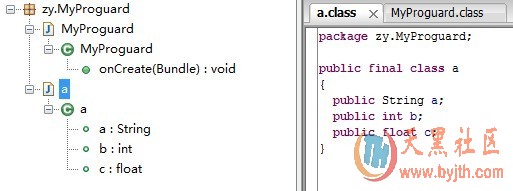
大功告成,正常的编译签名后就可以防止代码被反编译了。反编译经过代码混淆的apk得到的代码应该类似于下面的效果,是很难看懂的:
如果您使用的是2.3之前的SDK版本也没关系,把上面的proguard.cfg文件复制一份放到项目中,然后进行相同的操作即可